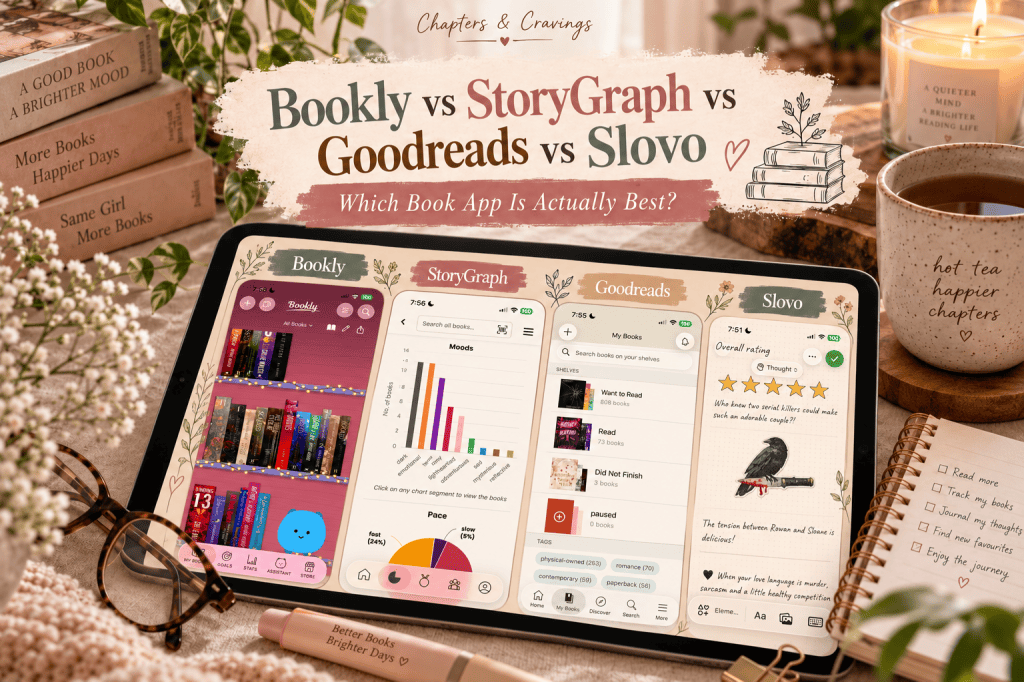
Four book apps, four very different approaches to tracking my reading — and apparently one app simply isn’t enough anymore.
Apparently, just reading a book isn’t enough for me anymore. Now I need to know exactly what I read, when I read it, how long I spent with it, how many pages I managed before the kettle boiled, whether it left me emotionally wrecked, what everyone else thought, and which quote made me stop and stare into space like I’d just seen a ghost. Honestly, if I could track the moon phase every time I give a book five stars, I probably would. (But let’s pretend I have some boundaries.)
So now I’ve somehow ended up with four book apps living on my phone: Bookly, StoryGraph, Goodreads, and Slovo. I could try to be sensible and pick just one, but where’s the fun in that? Instead, I started thinking maybe the real adventure is figuring out what each one actually does best. They all let me track my books, but each one has its own little personality—like four very different bookish friends.
Bookly has been my trusty reading tracker for a few years now, and it’s all about the act of reading itself—timers, stats, and that satisfying feeling of logging another chapter before bed.
StoryGraph, on the other hand, is determined to turn my slightly chaotic reading habits into beautiful graphs and charts. It’s like having a very enthusiastic librarian who loves data and doesn’t judge my dark romance phase.
And then there’s Goodreads. Old faithful. The app that’s been around forever and probably knows more about my reading history than I do.
Slovo is the new kid on the block, and it’s all about turning your reading life into a personal journal. Think less spreadsheets, more cosy notes and memories about each book.
So instead of just tossing out another list of book apps you could try, I thought I’d actually dig in and see what each one is really like. How do they show off your books? What can you actually track? What’s free, what’s hiding behind a paywall, and what’s changed lately? And, the big question: which app should I actually use? (Spoiler: I’m still using all four, but I have my reasons. Honest.)
Prices and features checked October 2026. App prices and subscriptions can change, so always check your own App Store before subscribing.
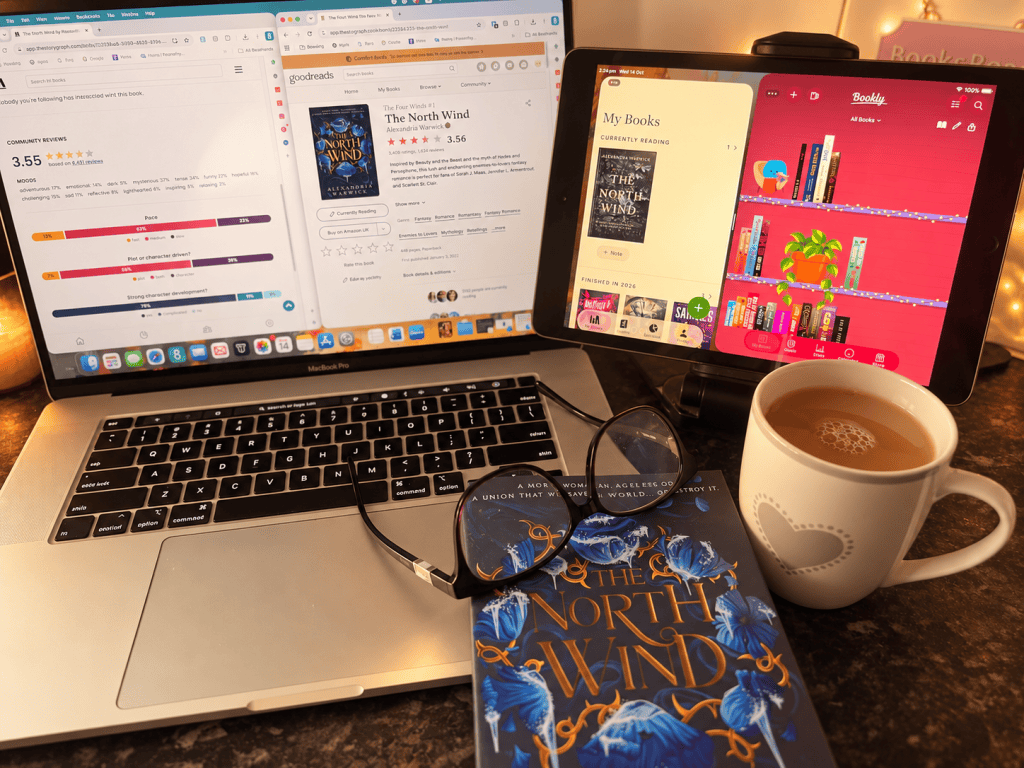
📚 Bookly — The One That Actually Watches Me Read
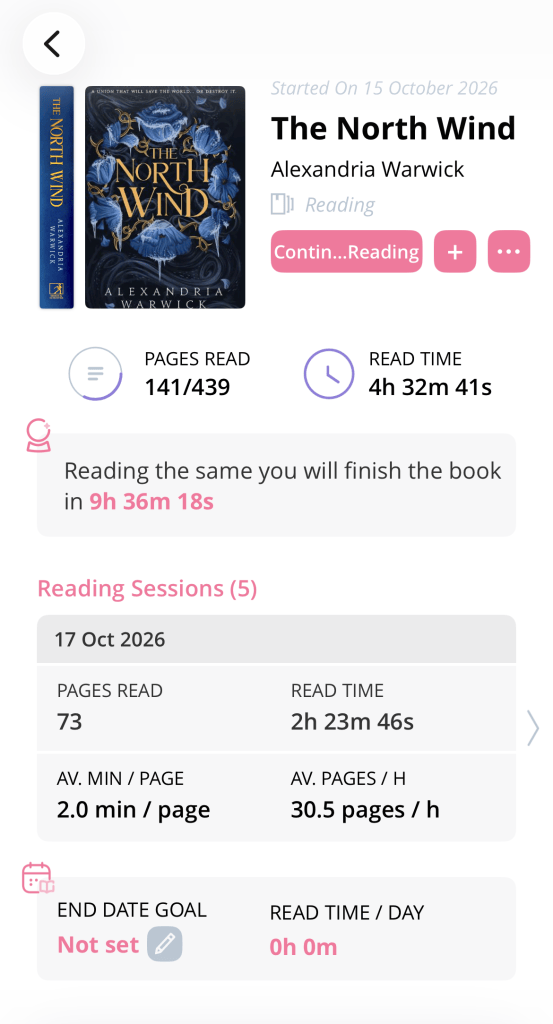
Bookly is already miles ahead for me, mostly because we’ve been in a committed relationship for years now. The thing that really sets Bookly apart from Goodreads is that it doesn’t just tick off a book as ‘read’ and call it a day. Instead, it actually tracks the reading itself. I tap a timer when I settle in with my book, pause it when I get distracted by snacks or small humans, and update my page number as I go. After a while, Bookly starts building up all these stats about my reading habits—how long I’ve spent with my nose in a book, how many pages I’ve managed, my reading speed (which is sometimes impressive, sometimes embarrassing), streaks, and even a guess at when I’ll finish based on my current pace.
So while Goodreads might politely note that I finished a 500-page fantasy romance, Bookly knows the real story. It remembers that I devoured 130 pages in one giddy evening, abandoned the poor book for three days (sorry, main character), and then made the questionable life choice of staying up all night to finish it. Priorities.
Bookly is happy with whatever you throw at it—physical books, ebooks, audiobooks, you name it. You can set goals for each book, save your favourite quotes, jot down notes, invent your own rating system (because sometimes five stars just isn’t enough), keep track of characters, join readathons, organise collections, and set big-picture reading goals if you’re feeling ambitious.
📖 How Your Books Are Displayed in Bookly
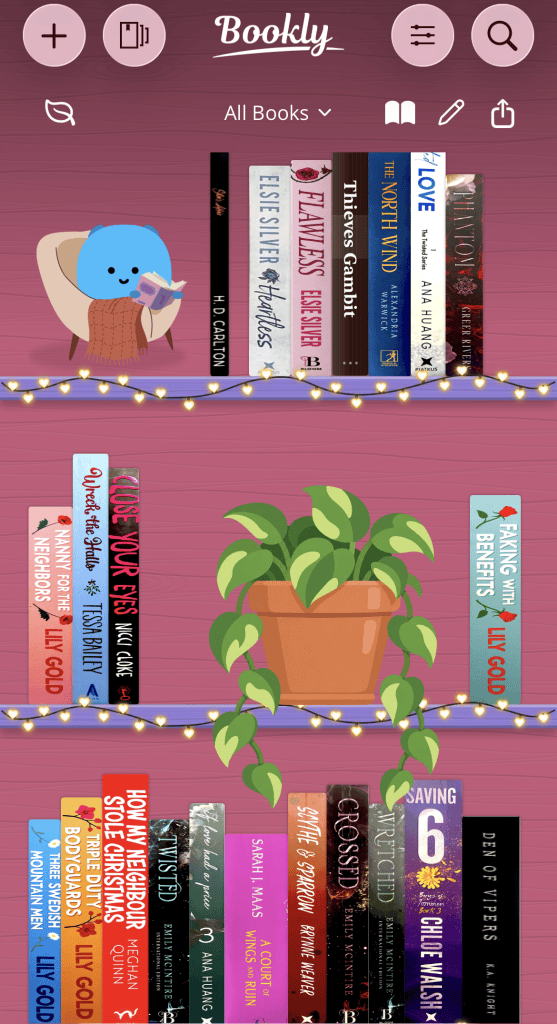
Bookly has had a bit of a glow-up lately. The library was already practical enough, with all my books lined up by cover and collection, but now Bookly has taken things to a whole new level of bookish delight.
Back on 5 October 2026, Bookly dropped version 1.19 and honestly, I might have squealed a little. The new Bookshelf means you don’t just get a grid of covers anymore—you get actual book spines lined up on virtual shelves, just begging to be admired. You can pick your shelf style, rearrange your books to your heart’s content, and even add little decorations and plants. There’s a Bookshelf widget for your Home Screen too, so now my phone looks like a tiny library. I love this update. It makes the app feel like a real, lived-in bookshelf, and I’m not even sorry about how much joy that brings me.
Do I technically need my virtual books to sit next to virtual plants? No. Do I want them to? Obviously.
There’s more: the update added a swipey book discovery feature (swipe right to add to your TBR, which feels dangerously easy) and a spinning wheel that picks your next read when you’re stuck in indecision mode. But here’s what I really love: Bookly now feels like two apps in one. The library and bookshelf side is all about pretty shelves and customising things to your heart’s content, while the individual book side is still gloriously nerdy with stats, reading sessions, quotes, characters, and reviews. Honestly, I need both. Give me the pretty shelves and the data—I want it all.
⏱️ The Reading Timer Is Still Bookly’s Killer Feature
Here’s what keeps luring me back to Bookly: you tap start, you read, you tap stop, and Bookly takes care of all the clever bits. It tells you how long you’ve read, how many pages you’ve managed, and even tracks if you’re speeding up or slowing down (which, in my case, depends entirely on the snack situation). It’ll guess when you might finish your book, which is either motivating or mildly alarming. There are background sounds if you like a bit of atmosphere, little achievements to collect, and gentle nudges if you’re trying to build a reading habit that actually sticks.
If you’re the sort of person who delights in knowing far too much about your own reading habits, Bookly is basically a treasure trove. And yes, I am absolutely talking about myself here.
The only catch? Bookly can only track the reading you actually remember to log. So if you get swept up in a story and forget to hit start, suddenly you’ve leapt 80 pages ahead with no evidence. I have absolutely done this, more than once.
📚 Bookly Readathons
Bookly has four official Readathons, and honestly, they make the app feel way more like a book club than I expected. Each one is a short, themed challenge (about eleven days long) with fun prompts and reading goals—basically, a perfect excuse to get a little competitive about your page count.
The 2026 Readathons are:
📓 Chapter One — January
A fresh-start challenge for the beginning of the reading year.
🧹 TBR Clean-Up — April/May
Designed specifically to attack those books that have been quietly judging you from the TBR pile.
📵 Beat the Scroll — August
A challenge built around replacing some scrolling time with reading.
And Bookly has now announced its fourth Readathon of the year:
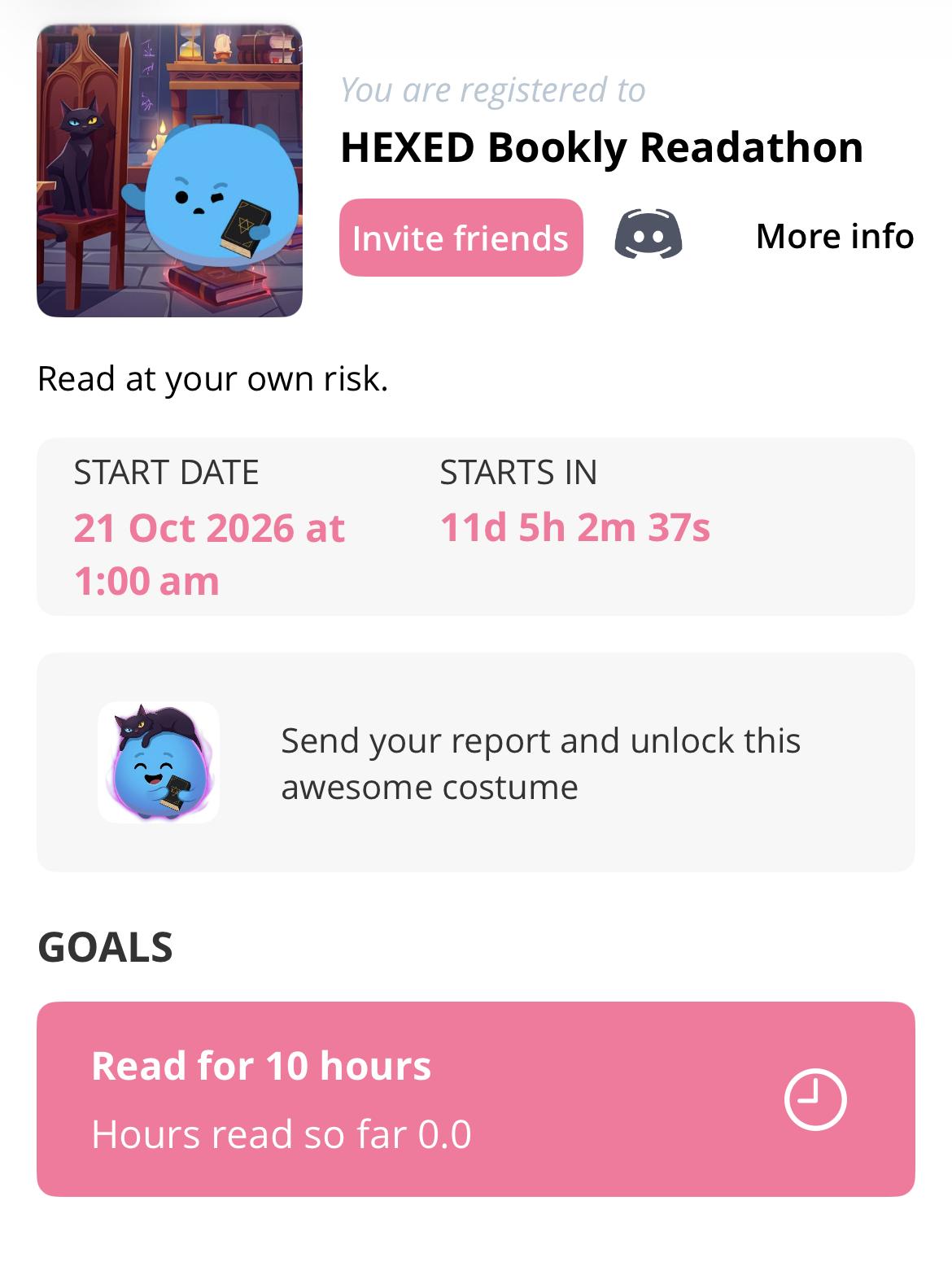
🔮 HEXED — 21–31 October 2026
The newest Readathon is HEXED, and it’s got all the spooky, cursed-library vibes you could want for Halloween.
Registration opened on 7 October, and the prompts are a treat: creepy reads, magical books, neglected TBRs, and even that one book everyone told you to avoid. Of course I’m tempted.
Achievement levels go from Spell Starter all the way up to Curse Breaker, but if you want that top spot, you’ll need to read for over forty-five hours in just eleven days. I mean, that’s wild. I have to admire the ambition.
Since Bookly already keeps track of your reading sessions, all your hours, pages, and progress count automatically during the Readathons. Some of them even throw in community reading sprints and prizes, which just makes everything feel even more like a group hangout.
💎 What Do You Get With Bookly Pro?
Bookly is free to download and play around with, but if you want to unlock all the fancy tracking features, you’ll need to look at Bookly Pro.
The current standard UK prices are:
| Bookly Pro | Price |
|---|---|
| Monthly | £4.49 |
| Six months | £17.49 |
| Annual | £26.49 |
Sometimes they throw in a discounted annual offer, so don’t be surprised if you spot a different price popping up in the app.
If you end up using Bookly all the time (guilty), the annual subscription is much kinder to your wallet than paying month by month.
But whether Pro is actually worth it really depends on what you want from Bookly in the first place.
If you’re just after a place to log your books, there are cheaper (and totally free) options I’ve mentioned in this post, so Pro is a bit of a tough sell.
But if you’re a stats lover and want all those detailed reading session reports, that’s where Bookly really shines—and suddenly the higher price starts to make sense.
🆕 Bookly Has Been BUSY
The October Bookshelf update isn’t the only shiny new thing Bookly has rolled out lately. Back in September 2026, they added a feature that lets you snap a photo of your actual, real-life books and—like magic—they appear in your library. Earlier in the year, they made ISBN scanning less of a guessing game, tidied up collections, and made searching for books online much easier. But the real showstopper?
In April, Bookly introduced a feature that feels straight out of a slightly chaotic, bookish future: you can now share or paste a BookTok video into the app, and it will try to figure out which books are being raved about and add them straight to your TBR. As if my TBR needed any help growing out of control. Honestly, it’s like Bookly looked at my already teetering pile and said, ‘Let’s make this even more dangerous.’
They’ve also been busy adding themes (hello, pretty colours), snazzier infographics, custom ratings, and much better audiobook support. I used to think of Bookly as just my trusty reading timer, but honestly, it’s starting to feel like the place where my entire reading life lives now. All my bookish chaos, neatly corralled in one app—well, as neat as my reading life ever gets.
✅ What I Love About Bookly
Honestly, nothing beats the reading timer for me. There’s something so satisfying about seeing exactly how much time I’ve spent lost in a book, instead of just ticking off another title from a list.
The stats are simple but oddly delightful, and I actually look forward to checking those little reports—like a mini celebration of my reading life.
The Readathons give me just enough structure to keep things interesting, but without making Bookly feel like another social media app I have to keep up with.
Plus, the new visual customisation options have given it a bit more personality—finally! It actually feels like my own little reading corner now.
❌ What I Don’t Love
You really do have to remember to track every single reading session, which is honestly a bit of a commitment. Forget once, and suddenly your stats are all out of whack.
If the idea of starting and stopping a timer every time you pick up your book makes you sigh, you might find Bookly loses a lot of its magic.
It’s definitely quieter on the social front compared to Goodreads or StoryGraph, unless you’re joining in on something like a Readathon.
You’re not really opening Bookly to see what everyone else thought about your latest book. That’s just not what it’s for, and honestly, that’s okay.
You’re there because you want to know exactly how long you spent with your nose in that book, and that’s where Bookly really shines.
Best for: Tracking your actual reading habits
Standout feature: Reading timer
Stats: ⭐⭐⭐⭐⭐
Community: ⭐⭐
Challenges & goals: ⭐⭐⭐⭐½
Visuals: ⭐⭐⭐⭐½
Free version: Useful, but Pro matters more here than on some competitors
📊 StoryGraph — For Readers Who Want ALL THE DATA
StoryGraph feels like what would happen if someone peeked at my reading history and decided it was missing a few good pie charts. Honestly, I get it. Who doesn’t want to see their bookish habits turned into colourful graphs?
While Bookly is all about timing your reading sprints (and making you feel like a speed-reading champion), StoryGraph is more like a bookish detective. It keeps tabs on everything from your mood and genre choices to how long your books are and whether you’re listening or reading. Then it whips all that into stats and charts, so you can spot patterns you never knew you had. Apparently, I read way more moody thrillers than I thought. Who knew?
There’s also a whole buffet of extras: personalised recommendations (dangerous for my TBR), reading challenges, friends and followers, Buddy Reads, Readalongs, Book Clubs, and even the magic trick of importing your Goodreads history. It’s basically a playground for book nerds.
📖 How Your Books Are Displayed in StoryGraph
StoryGraph is basically the practical friend in the group—the one who actually remembers everyone’s birthdays and brings snacks to book club. It’s all about the details, and honestly, that’s exactly why I keep coming back.
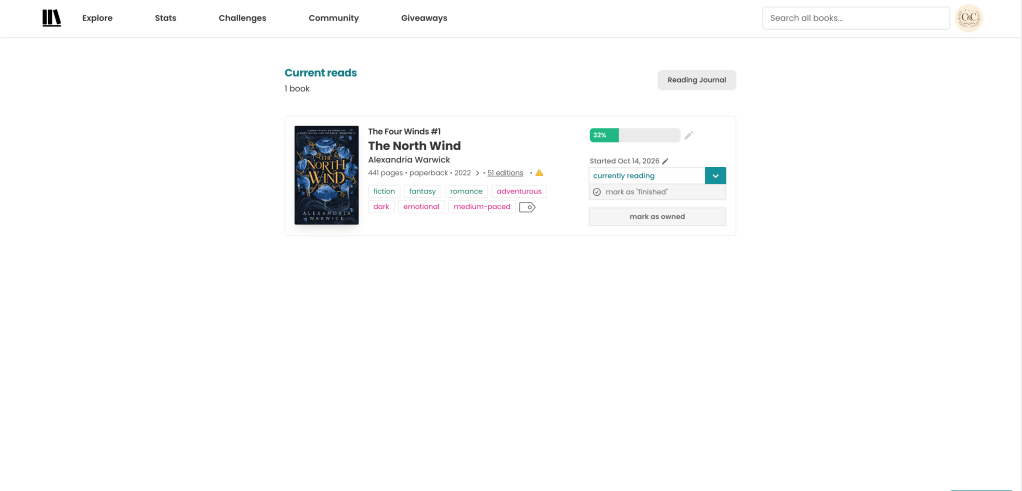
Every time I open StoryGraph, I get a little hit of bookish joy—covers to admire, of course, but also all the juicy details: title, author, edition, page count, ratings, even the mood and pacing. It’s like someone handed me a cheat sheet for my own TBR pile, and honestly, I need all the help I can get.
I can instantly spot if a book is emotional, dark, adventurous, medium-paced, and—brace yourself—400 pages long. No guesswork, just the facts. And yes, I absolutely let out a dramatic gasp when I see a real doorstopper.
Honestly, that’s so much more helpful than just staring at a pretty cover and crossing my fingers that I haven’t accidentally picked up something that will emotionally destroy me on a Tuesday night.
The Current Reads bit is all about you and your reading progress, while the rest of the app is basically a treasure trove of filters and info for when you want to get nerdy about your books.
It’s not trying to be one of those gorgeous bookshelves you see on Instagram, the kind you want to stare at with a cup of tea in hand.
Instead, it’s more like that helpful friend who actually remembers what’s on your shelves and will nudge you, saying, ‘Hey, that one’s a secret tearjerker,’ or, ‘Save this for a rainy afternoon with biscuits.’
📈 StoryGraph’s Statistics Are Ridiculous — In a Good Way
Okay, here’s where StoryGraph completely leaves Goodreads in the dust.
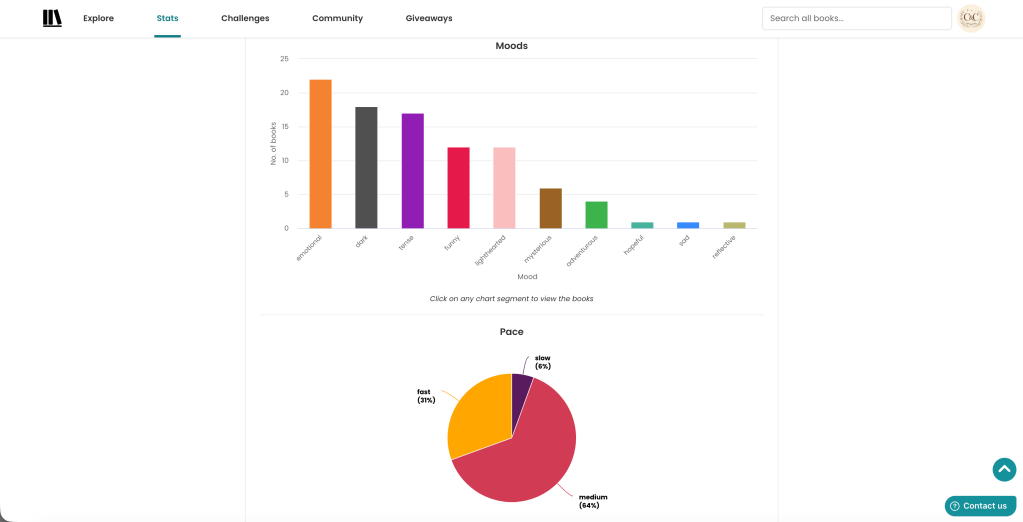
You can actually see your reading broken down by book length, genre, and even format. It’s like getting a peek behind the curtain of your own reading habits.
So instead of just announcing, “I read 80 books this year,” and leaving it at that—
StoryGraph gently points out, “Yes, and apparently most of them left you emotionally wrecked.” Which, honestly, feels a lot more revealing than just a number on a page.
And, well, that tracks. My poor heart.
It even uses all these little reading quirks to suggest new books you might actually want to read.
Instead of just tossing you a random romance, you can mix and match moods and pacing until you find something that fits exactly what you’re craving right now.
That’s why StoryGraph feels less like a digital bookshelf and more like a little reading detective, quietly piecing together your bookish personality.
👯 StoryGraph’s Community — Friends, Buddy Reads, Readalongs & Book Clubs
StoryGraph isn’t quite the lonely spreadsheet full of pie charts it might initially appear to be.
There’s actually a fairly substantial Community side to the app.
You can add friends, follow other readers and see their reading activity, while StoryGraph can also suggest potential reading buddies based on your tastes.
Then you’ve got Buddy Reads.
These are essentially small group reads where you can read the same book alongside friends or other StoryGraph users and discuss it as you go.
If none of your existing friends fancy the book you’ve chosen, you can also browse public Buddy Reads and join one that’s already happening.
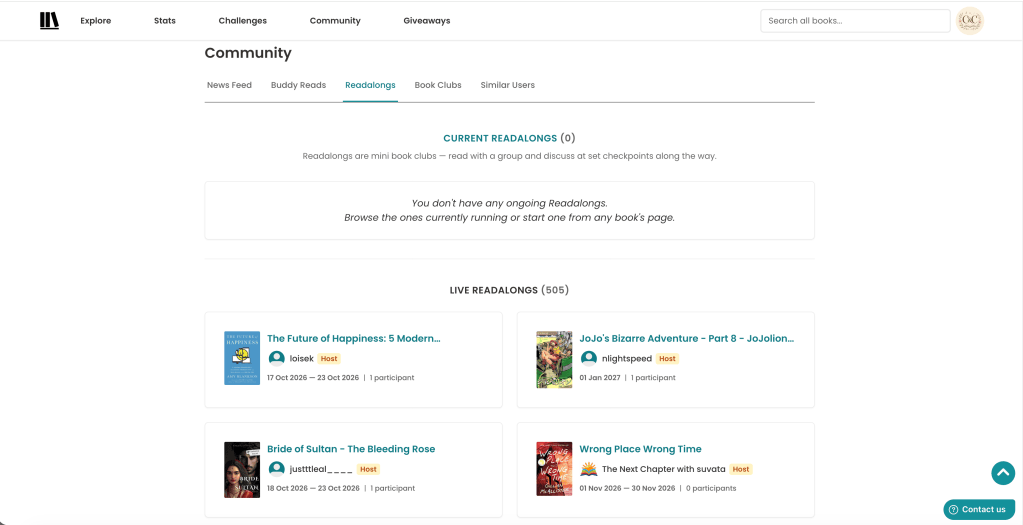
Then there are Readalongs, which are particularly useful for larger groups and organised discussions. StoryGraph lets you browse open Readalongs through its Community area alongside Buddy Reads, so you don’t necessarily need to arrive with your own group of reading friends.
And finally there are proper Book Clubs.
StoryGraph Book Clubs can organise meetings, vote on upcoming books and host discussions all within the platform.
So StoryGraph isn’t lacking community features at all.
They’re just structured differently to Goodreads.
Goodreads feels like a giant public bookish social network where I finish a book and immediately dive into thousands of reviews.
StoryGraph feels more like:
“Want to actually read this WITH somebody?”
And I really like that difference.
The one thing it still doesn’t quite have is the casual conversation Goodreads offers around everyday activity. At the moment StoryGraph is working on the ability to comment directly on friends’ reading updates and reviews, with controls planned so users can decide whether comments are allowed.
If that rolls out properly, StoryGraph’s social side could become considerably stronger.
💎 StoryGraph Plus — Do You Actually Need It?
Here’s where StoryGraph really pulls ahead of Bookly, at least for me: the free version is already brilliant. You get all the basics—stats, reading tracking, recommendations, and a whole bunch of features—without needing to pay for Plus. Honestly, it feels like you’re getting the good biscuits without anyone checking if you’ve paid for the fancy tin.
Plus, on the other hand, is for those of us who see a graph and immediately want three more. With StoryGraph Plus, you unlock custom pie and bar charts, extra ways to filter your stats, average-rating breakdowns, custom wrap-ups for any time period you fancy, and all sorts of ways to compare your reading history. Want to see how your taste in books changed between 2021 and 2023? Or which genre secretly took over your life last summer? You can. It’s the kind of thing that could easily turn reading into a full-on data obsession, and honestly, I’m not even pretending to resist.
The current UK App Store pricing is:
| StoryGraph Plus | Price |
|---|---|
| Monthly | £3.49 |
| Annual | £34.99 |
You can even try out Plus for 30 days, just to see if you fall in love with all those extra charts. Out of all the apps I’ve tried, StoryGraph is the one where I feel the least nagged to upgrade. The free version is generous enough that you don’t feel like you’re missing out, and Plus actually feels like a treat instead of a ransom note for the features you wanted in the first place.
🆕 StoryGraph’s Recent Updates
Okay, Kobo people, this one’s for you! StoryGraph finally rolled out Kobo integration this summer, and honestly, it feels like magic. Now Kobo reading progress just shows up in StoryGraph without me having to remember to update anything. No more frantic late-night catch-ups or wondering if you actually finished that book last week. It’s the little things, isn’t it?
September brought a feature I didn’t know I needed: Private Books. Now, if you want to keep that slightly embarrassing vampire romance (or whatever your secret read is) all to yourself, you can! The title, author, cover, and review are hidden from everyone else, and it won’t pop up on your profile or stats. But your reading streaks and goals still count, so you get all the credit with none of the public side-eye. Read what you want, no confessions required.
August’s update focused on boundaries: StoryGraph finally introduced real user blocking. If you need a little peace and quiet from someone, blocking now means you both disappear from each other’s searches, reviews, and feeds. It even removes any follows or friendships and keeps you out of each other’s Buddy Reads or Book Clubs. Sometimes you just need your reading space, you know?
And coming up next? Comments on friends’ reviews and reading updates! I’m already picturing the late-night chats and dramatic debates over plot twists. Once this lands, StoryGraph will feel even more like our own cozy book club—and honestly, it might finally give Goodreads a run for its money.
✅ What I Love About StoryGraph
The stats are fun to look at, but honestly, what I love most is how the app actually helps me understand my own reading habits. It feels like having a little reading diary that finally makes sense of my bookish chaos.
It’s not just a list of books I’ve read—it’s more like the app is gently nudging me to notice patterns I’d never spot on my own. Suddenly, I’m seeing what moods I gravitate towards and which books I keep coming back to.
Honestly, mood-based discovery is a game changer. Instead of scrolling forever through random suggestions, I can actually find books that fit how I’m feeling right now. It’s like the app gets me—and that’s rare.
I’ll admit, I underestimated the community side at first. But Buddy Reads, Readalongs, and Book Clubs aren’t just about peeking at what everyone else is reading. They’re actually set up so you can read together, chat about the twists, and maybe spiral a little over fictional heartbreaks with people who get it.
And just in case you’re wondering, the free version is actually generous enough that you don’t feel like you’re missing out if you’re not ready to commit.
❌ What I Don’t Love
StoryGraph always gives me a bit of a doctor’s office vibe, especially when I compare it to the cosy, bookshop-window look of Slovo or Bookly’s new bookshelf. Where are my warm, fuzzy reading nooks?
Honestly, there is just so much information. It’s like walking into a library and forgetting what you came for because you got distracted by all the shiny stats.
And yes, there are social tools, but chatting with friends still feels a bit awkward compared to Goodreads. I can join a Buddy Read or a Book Club, but I can’t just pop in and leave a quick comment under a friend’s update or review. It’s like being at a party where you have to schedule your conversations instead of just jumping in.
So Goodreads still wins when it comes to that big, never-ending group chat energy.
Meanwhile, StoryGraph feels more like a set of organised activities for reading together, which is lovely in its own way, but it doesn’t quite scratch that itch for spontaneous bookish banter.
Best for: Understanding your reading tastes
Standout feature: Statistics and graphs
Stats: ⭐⭐⭐⭐⭐
Community: ⭐⭐⭐⭐
Visuals: ⭐⭐⭐
Free version: ⭐⭐⭐⭐⭐
⭐ Goodreads — The Old Faithful That Refuses to Die
Of course, Goodreads is still hanging around. Honestly, I’ve been using it for so long that the idea of leaving feels a bit like tossing out my old diaries—so many years of reading memories, all in one place. Goodreads has been around since 2007 and somehow turned into this massive bookish hangout.
The whole thing is delightfully straightforward: Want to Read, Currently Reading, Read. You just add your books, give them a star rating (or a dramatic rant, if needed), peek at what your friends are up to, and fall down the rabbit hole of other people’s reviews. It’s the bookish equivalent of comfort food—easy, familiar, and always there when you need it.
📖 How Your Books Are Displayed on Goodreads
Goodreads and I have a complicated relationship. It works, sort of, but only if you squint and lower your expectations.
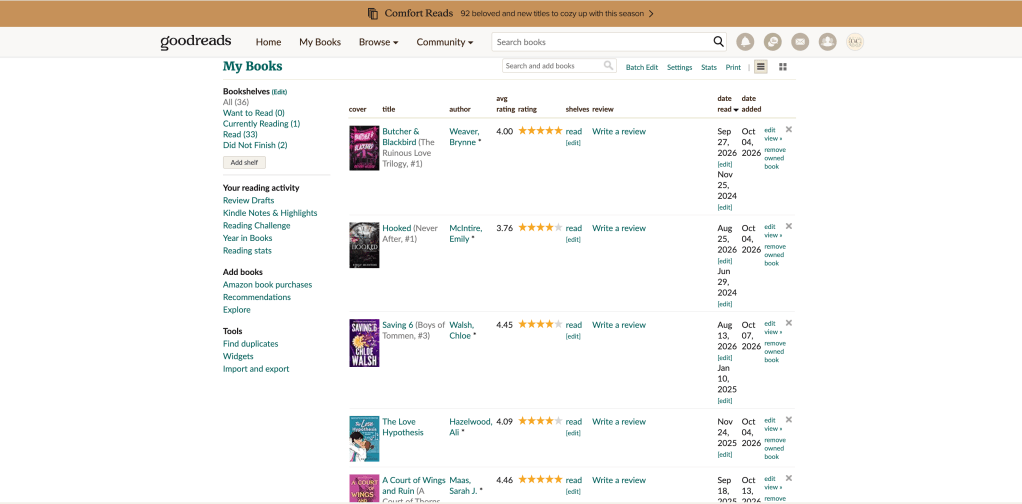
The My Books section is basically my digital book hoard: shelves, covers, reading statuses, and a running tally of how many books I’ve optimistically added to my Want to Read pile. There’s the usual suspects—Want to Read, Currently Reading, Read, and now Did Not Finish—plus all the random custom shelves I’ve created in a fit of organisation.
This is the part where Goodreads starts to show its age. Bookly has given me a shiny virtual bookshelf to admire. Slovo wants me to get crafty and scrapbook every reading mood. StoryGraph is practically throwing charts and stats at me. Meanwhile, Goodreads just shrugs and says, ‘There you go, that’s your book.’
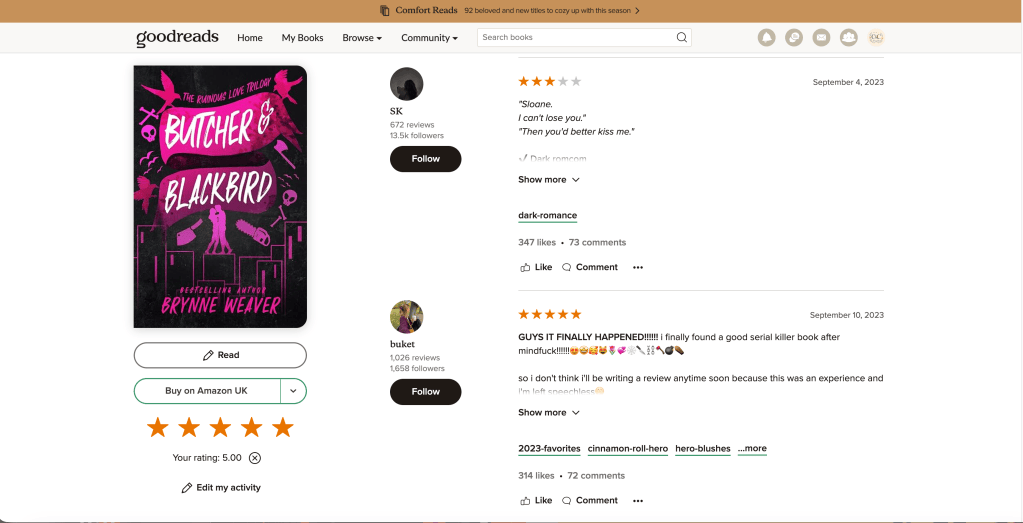
But here’s where Goodreads redeems itself: open up a book page and suddenly you’re in the middle of a bustling book club. There are ratings, reviews (some delightfully dramatic), friends’ hot takes, quotes to save for later, endless editions, recommendations, lists, and more discussions than I could ever keep up with. It might not be the prettiest bookshelf on the block, but none of the shiny new apps can match the sheer mountain of reader opinions you’ll find here.
💬 Goodreads Still Wins the Social Side
Honestly, this is why I just can’t quit Goodreads. The shiny new apps are tempting, but none of them quite scratch the same itch for me.
You finish a book and immediately need to know if everyone else wanted to yeet that one character into the sun, or if it’s just you?
Goodreads.
Or maybe you’re still spiraling about the ending and need to check if the collective internet is also mildly (or majorly) outraged?
Goodreads.
Craving five-star gushes, deep-dive essays, three-line rants, and that one person who leaves a single star because their paperback arrived late? (Honestly, the drama is half the fun.)
Goodreads.
There’s just so much reader history and bookish chaos already baked into Goodreads. No shiny new app can magic that up overnight.
So for now, Goodreads is my trusty sidekick. The new apps can join the party, but I’m not kicking out the old friend just yet.
💎 Goodreads Premium
Ready?
There isn’t one.
Goodreads is still free for us regular bookworms. No Plus, no Pro, no fancy stats package, and not a single shiny crown icon trying to lure me into yet another yearly subscription. Honestly, that kind of no-strings-attached access is something I really appreciate.
Sure, you won’t get StoryGraph’s beautiful stats or Bookly’s minute-by-minute reading breakdowns. But if you’re just after books, shelves, ratings, reviews, a few bookish friends, some recommendations, and that all-important yearly challenge, the grand total is exactly £0. My favourite price.
🆕 Goodreads Has Apparently Woken Up in 2026
I honestly have no idea what kind of magic (or caffeine) they’ve been drinking at Goodreads HQ this year, but someone must have finally unearthed the dusty old feature-request folder. Because, friends, Goodreads is actually rolling out the updates we’ve all been begging for since forever.
First up, back in February, they gave us review drafts. No more frantic copy-pasting into Notes when the toddler interrupts mid-rant—now your half-finished reviews just quietly save themselves. Then came the official Did Not Finish shelf. No more cobbling together your own weirdly-named DNF shelf (mine was called ‘abandoned ships’ for a while). Now there’s a real, grown-up option, and you can even log exactly how far you got before tapping out. All your ratings, reviews, and reading history stick around, too.
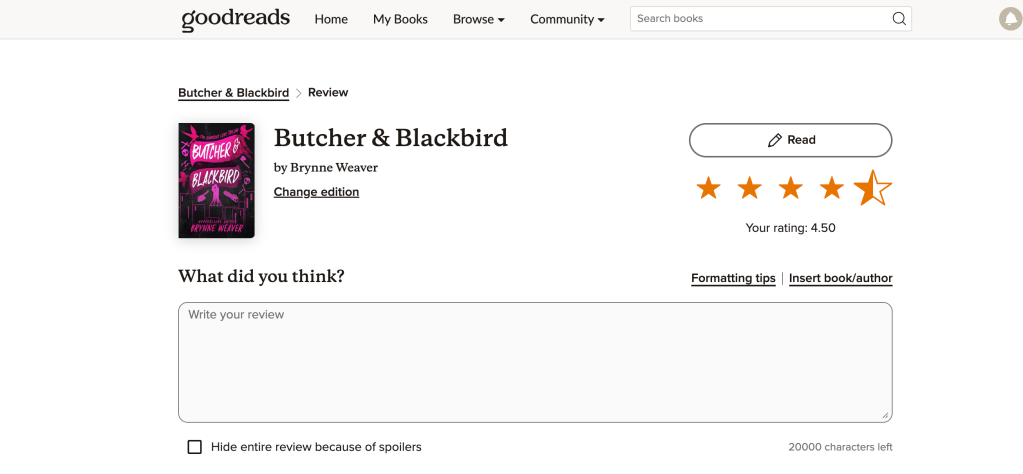
But the real plot twist? On 5 October 2026, Goodreads finally did the thing:.
⭐ HALF STARS HAVE ARRIVED.
Except, in true overachiever fashion, they didn’t just stop at half stars. Nope. Now you can rate books in quarter-star steps, from 0.25 all the way up to 5. So if you’ve ever agonized over whether that book was a 3.25 or a 3.5 (just me?), you’re officially covered.
After years of typing, ‘Actually 4.5 stars but Goodreads won’t let me,’ in every other review, it finally feels like we’ve reached the promised land. I might actually stop yelling at my phone now. (No promises.)
✅ What I Love About Goodreads
Honestly, the community here is something special.
There are years’ worth of reviews tucked under every popular book, and I love scrolling through them after I finish reading. Sometimes I’ll spot a comment that makes me laugh out loud, or someone will put into words exactly why a book hit me right in the feelings. It’s like having a whole book club at my fingertips, helping me figure out why I loved (or didn’t love) what I just read.
And the best part? It doesn’t cost a penny. Free bookish fun is always a win in my world.
All my reading history is already tucked away there, so Goodreads feels less like another tracker and more like my own little bookish time capsule. That’s probably why I keep wandering back, year after year.
❌ What I Don’t Love
Honestly, it still looks a bit like it’s stuck in a time warp compared to the shinier apps out there.
If you’re after fancy stats, you might be a little underwhelmed here—especially if you’ve peeked at StoryGraph or Bookly.
Even with all the recent updates, some corners of Goodreads feel like they haven’t had a fresh coat of paint in years.
Best for: Reviews and community
Standout feature: Massive reader database
Stats: ⭐⭐
Community: ⭐⭐⭐⭐⭐
Visuals: ⭐⭐½
Free version: Everything! There’s no paid upgrade lurking in the shadows here.
✏️ Slovo — The Newcomer That Wants Me to Remember My Books
Now, let me introduce you to something completely different: Slovo.
Slovo is the new kid on the block, and instead of trying to be the next big social reading thing, it’s more like your own private reading journal. The whole idea is to help you actually remember what you’ve read.
Honestly, I love the whole concept. Just because I’ve finished a book doesn’t mean I actually remember it. There are five-star reads on my Goodreads that I couldn’t summarise if you paid me. Ask me what happened? I’ll just say, ‘I loved it!’ and hope you don’t ask for details. Slovo is here to rescue people like me by helping you hang onto the bits that matter.
You can save quotes, jot down your thoughts, keep track of characters, new words, questions, reviews, and all those little reactions that pop up while you’re reading. You can type, talk, or even snap a photo of the page to add notes, and then make your journal look as pretty or as practical as you like with different themes and options.
📖 How Your Books Are Displayed in Slovo
Out of all four apps, this one is definitely the prettiest to look at. Imagine your own little library, but instead of dusty shelves, you get a wall of colourful book covers and neat little reading statuses. It feels so much more personal than Goodreads—like you’ve been handed your own reading nook, but digital. And when you finish a book, it gets tucked away by month (or by year if you’re feeling very accomplished), so the whole thing ends up looking like a diary of your reading life.
But here’s where it gets fun: when you open up a book, you don’t just get a boring old review box. Instead, you get to build a whole journal around it. I’m talking quotes, dramatic callouts, star ratings, character lists, and even little Q&As if you’re feeling extra. There are scrapbook vibes, sketchbook vibes, paper colours to match your mood, grids for the organised among us, and—my personal favourite—AI-generated stickers that actually match the book you’re journalling about. It’s like arts and crafts, but for bookworms.
So basically: Bookly tracks your reading time, StoryGraph gives you a pie chart explaining your emotional damage, Goodreads offers 8,000 strangers’ opinions, and Slovo turns your reading into a tiny sticker-fuelled journal. Me? Unfortunately, yes. 😂
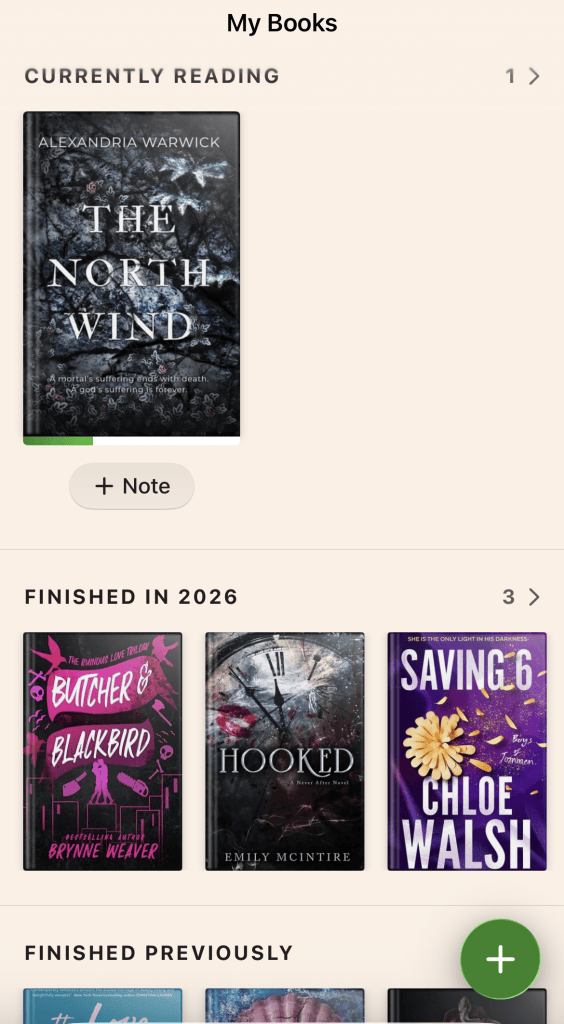
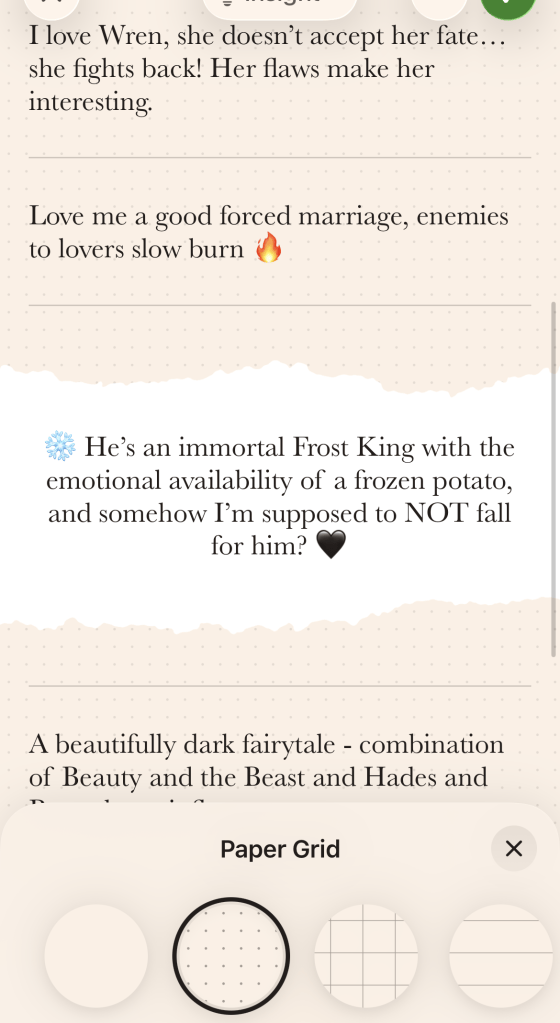
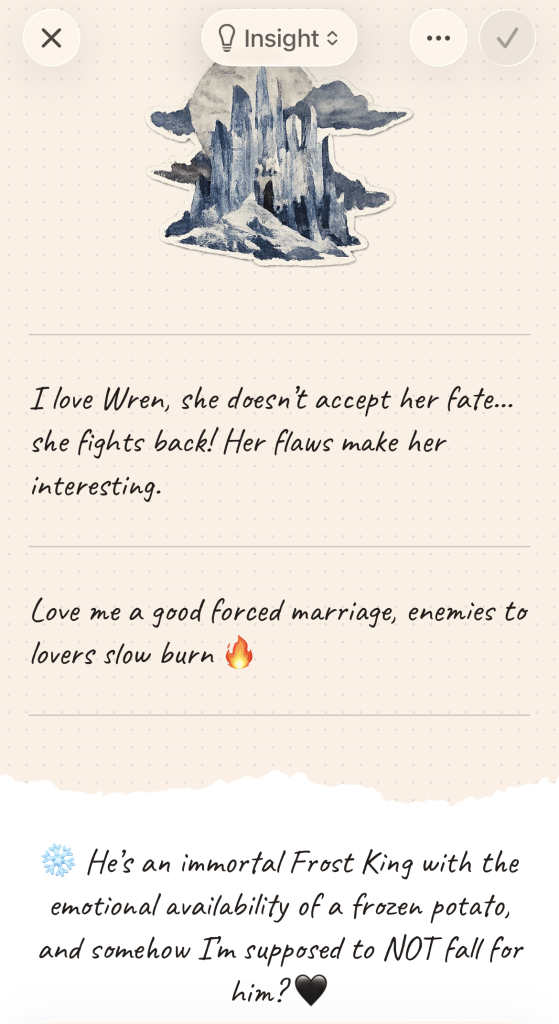
🎨 The AI Stickers Are Much Cleverer Than I Expected
Okay, confession time: I totally underestimated this Slovo feature at first.
When I first spotted the word ‘stickers,’ I pictured the usual suspects: books, hearts, flowers, maybe a coffee cup or two. You know, the kind of thing you slap on every journal page just because they’re there. But no! Turns out, when you’re inside a book’s notes, Slovo actually uses AI to whip up stickers inspired by that specific book. Not just a random pack, but little designs that actually belong to the story I’m journaling about.
So suddenly, the stickers aren’t just cute—they actually match the book. Think: the atmosphere, the little objects, the characters, all those details you’d recognise if you’ve read it. Honestly, it flips the whole feature for me. Instead of just ‘Here, stick something pretty on your notes,’ it’s like building a mini mood board for the story right there in your journal.
And as someone who lives for annotations, character aesthetics, and the occasional Pinterest spiral, this is exactly the kind of unnecessary-but-brilliant thing that makes me weirdly happy. The best part? Two different books can end up with journals that actually look and feel like those books, instead of every page being the same old template with a new title slapped on top.
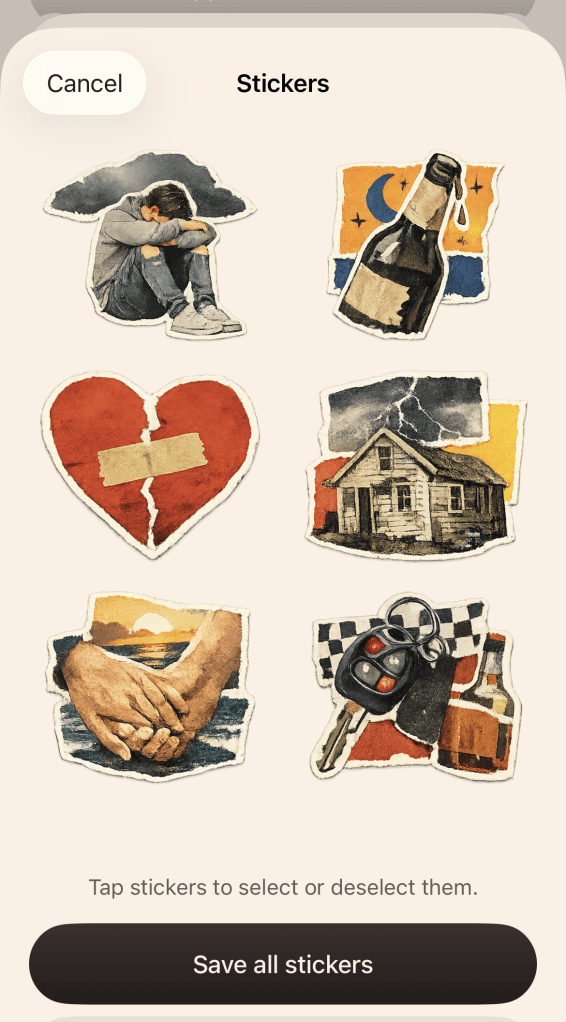

And apparently Slovo wasn’t finished with the stickers either.
An update that landed just before this post went live added much more freedom when decorating your journal: stickers can now be resized and rotated however you want, and even book covers placed inside notes can be resized and rotated too.
There’s also a new Photo Collage sticker style, which gives generated sticker packs a more photorealistic look, alongside the existing styles.
Basically, Slovo saw me getting carried away with the scrapbook feature and decided to actively encourage the behaviour.
📔 This Is Where Slovo Really Stands Apart
Slovo feels so much more personal than Goodreads. It’s less about performing for other readers and more like scribbling down the bits of a book that actually meant something to you.
Maybe you jot down a favourite quote, or gush about a character you’d happily adopt—or, let’s be honest, the one you’d cheerfully toss to the wolves. Sometimes it’s a wild theory you cooked up at chapter twelve, or that one thought that kept you wide awake at 1am, even though you promised yourself you’d only read one more chapter (we’ve all been there).
And when you finally reach the end, you can add your rating and a little wrap-up, so your score actually shows how the book landed for you—not just what you think you’re supposed to say.
You can even save those tiny visual details from the story with those clever AI stickers, which somehow make your reading memories feel a bit more alive (and a lot more fun to look back on).
Because everything lives together in that book’s journal, you can come back months later and actually remember what it felt like to read it—messy thoughts, wild theories, and all. That’s what makes Slovo stand out from the crowd.
📊 Slovo Has Proper Statistics Too
Honestly, I thought I had Slovo all figured out at first. Spoiler: I did not.
I opened up Slovo expecting nothing more than a pretty little journal app—something to jot down my bookish ramblings.
But then Slovo started quietly tracking everything I read, like a nosy librarian who also happens to love spreadsheets. Suddenly, there were stats for genres, formats, authors, book types—the whole lot.
Some of it feels a bit like StoryGraph, which I already love, but then Slovo throws in a few stats I’ve never really seen highlighted anywhere else.
🌍 Authors by Country of Origin
STake the ‘Authors by Country of Origin’ stat, for example. Slovo actually shows you where your authors are from, which is brilliant if you’re trying to branch out and then realise, oops, nearly every book on your shelf is from the same two countries. I would never have thought to keep tabs on that myself.
It’s actually kind of eye-opening, especially if you’re on a mission to read more widely and then get hit with the realisation that your reading passport barely leaves home. Definitely not something I’d ever have tracked with a spreadsheet. My brain just doesn’t work that way.
👤 Authors by Gender
Then there’s the author gender breakdown, and honestly? I’m still not sure how I feel about seeing that pop up. Insert nervous laughter here.
I get why some people would find it handy, especially if you’re trying to mix things up, but it’s definitely one of the stranger stats I’ve seen in a reading app.
I’m way more used to seeing something like ‘Fantasy: 37%’ than a pie chart of every author’s gender I’ve read this year.I can see why some readers would find it useful if they’re deliberately trying to diversify who they’re reading.
So for now, I’m filing that one under ‘Interesting, but do I actually need it?’ because honestly, I’m still on the fence. Either way, Slovo has definitely made me rethink my first impression. It’s not just a pretty face after all.
It’s sort of halfway between StoryGraph’s data obsession and a digital scrapbook for bookworms. And honestly? That’s a pretty great combo.
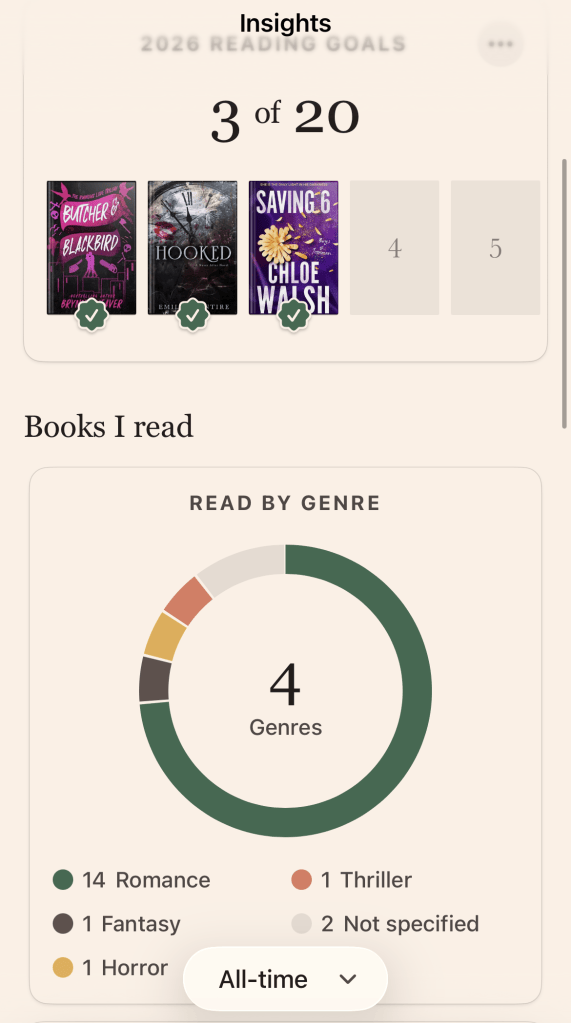
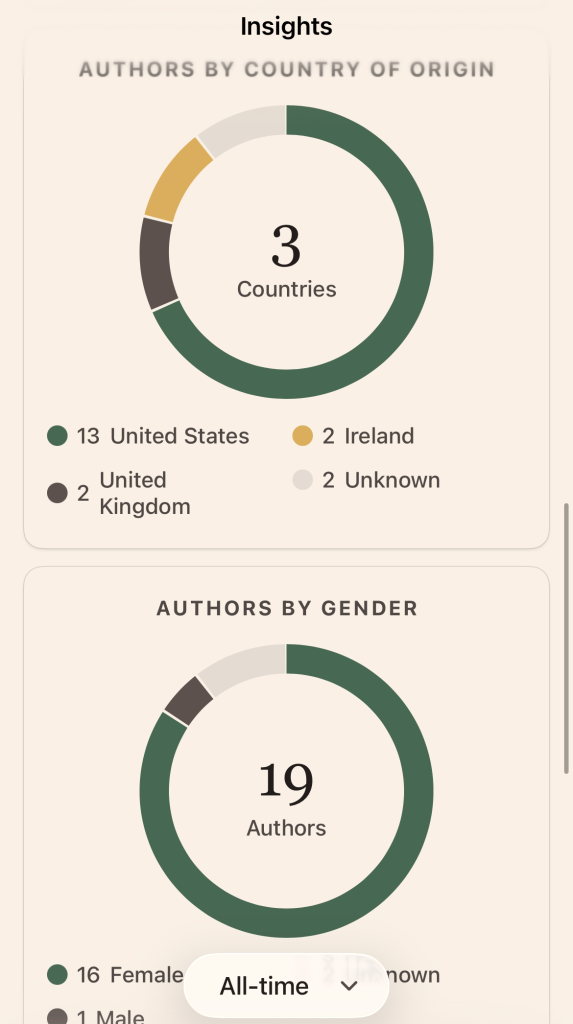
And this has already improved again since I started writing this post.
Slovo’s latest update now lets you tap individual categories inside your statistics to see exactly which books are contributing to them, rather than only looking at the graph itself.
The book editor has also gained additional fields so you can fill in missing information, which should make those statistics more accurate. That might sound like a small change, but I really like being able to go from:
“Apparently I read loads of fantasy.” to: “Okay, show me exactly WHICH books you’ve counted as fantasy.”
That’s the sort of detail that makes the statistics considerably more useful.
📚 Adding Books Isn’t Quite as Smooth
Slovo is still a baby app, bless it, and sometimes it really shows. The other day, I was happily scanning in my latest book buy, only to realise there’s no quick way back to the Home screen. Instead, I found myself bouncing from the camera, to search, and then finally back to Home—like some weird bookish obstacle course. If you’re just adding one book, it’s a minor annoyance. But if you’re like me and trying to wrangle your whole bookshelf into the app, it gets old fast. I may have muttered a few choice words at my phone.
And don’t get me started on adding the dates for books I’ve already read. Instead of a nice, simple calendar where you just tap the date and move on with your life, Slovo makes you pick the month, back out, pick the year, back out, and then do the same for the day. It’s like a weird little dance, except nobody’s having fun. Honestly, I just want to tap the date and be done—why make it harder than it needs to be?
None of this is a dealbreaker, to be fair. Slovo’s big promise is this gorgeous timeline of your reading life, and I love that idea. But right now, actually getting your books and memories in there feels a bit more like work than it should. Fingers crossed it gets easier soon, because I really want to see my reading history looking as pretty as they promised.
💎 Slovo Premium
You can use Slovo’s basic tracking and journalling for free, which is great if you just want to dip your toes in. But if you want personalised insights, unlimited journalling, and those fancy advanced stats, you’ll need the Premium version.
Now that I’ve actually poked around in Slovo’s stats, I get what they mean by ‘advanced analytics’. It’s not just paying extra for a fancier-looking journal (though I do love a pretty page). The real question is whether I’d actually use all those extra stats and journalling options enough to make the subscription worth it. I’m still figuring that out, so I’m not about to tell you to rush out and buy it just yet.
The current UK pricing is:
| Slovo Premium | Price |
|---|---|
| Monthly | £9.99 |
| Annual | £39.99 |
That actually makes Slovo the priciest standard annual subscription out of the bunch. The yearly plan is about £3.33 a month, which sounds much friendlier than coughing up £9.99 every single month.
Still, forty pounds a year is a fair chunk of book money, so those pretty journals, AI stickers, and extra stats really need to earn their keep!
🆕 Slovo Is Still Changing FAST
Slovo is easily the youngest app in this comparison, and you can tell from how quickly features are being added.
Since launching, it’s gained Goodreads importing, better offline support, improved organisation for finished books, expanded journal elements, scrapbook and sketchbook styles, paper customisation, AI sticker creation, social sharing and newer profile/account features. And apparently it couldn’t even wait until I’d published this post before updating again.
Version 1.1.6 landed just before publication, bringing another fairly substantial collection of journal and statistics improvements.
You can now:
↔️ Resize and rotate stickers freely inside your notes.
📚 Resize and rotate book covers used within journal pages too.
📊 Tap categories in your statistics to see exactly which books are included.
✏️ Add more information through the book editor, helping fill gaps and improve the accuracy of your statistics.
🔤 Add Word Art, with dozens of decorative text graphics available for journal pages.
📸 Generate stickers in a new Photo Collage style, giving them a more photorealistic look.
So when I say Slovo is changing quickly, I really do mean it.
I’ve been writing this comparison for barely any time at all and I’ve already had to update this section more than once. 😂
And I actually think that’s worth remembering when I’m moaning about some of the awkward navigation. Some of Slovo’s rougher edges may simply be the result of an app that’s still developing rapidly — and, based on how regularly new features are appearing, there’s every chance some of those niggles will look completely different a few updates from now.
The downside is that it’s still primarily an iPhone-first experience, so if you want a really polished experience moving constantly between phone, tablet and computer, it’s not quite there yet.
✅ What I Love About Slovo
Honestly, I didn’t even know I needed something between just ticking off a book and actually remembering it, but this app nails it. It’s like someone peeked into my brain and spotted the gap I hadn’t noticed.
It’s hands-down one of the prettiest apps I’ve tried, and every book feels like it’s got its own little personality. The journals? They actually feel like they belong inside the story, which is just delightful. The AI-generated stickers are ridiculous in precisely the right way, and the new resizing, rotation and Photo Collage options make the whole journal side even more flexible. Plus, the stats are way more detailed than I was expecting. I love a good surprise.
Honestly, Slovo has so many stats now that calling it just the “journalling one” feels unfair. It’s more like if StoryGraph’s data and a reading journal had a little get-together, and someone brought along a bag of digital stickers for fun.
It’s more like: StoryGraph’s data met a reading journal and bought a packet of digital stickers.
❌ What I Don’t Love
You can definitely tell it’s still finding its feet. There’s a bit of that shiny, just-out-of-the-box feeling—and not always in a good way.
Adding books feels a bit clunky, honestly. Trying to put in older reads is a faff, especially when the dates get fiddly and the navigation after scanning leaves me muttering at my phone. These might sound like little things, but trust me, they add up fast when you’re staring down a mountain of past reads.
The Premium plan is the priciest of the bunch at £39.99 a year, so I’d really want those fancy analytics and unlimited journalling to feel worth it. If I’m paying that much, I want to feel a little bit spoiled, you know?
The stats are definitely impressive, but things like the author-gender breakdown leave me torn between raising an eyebrow and wondering if I’ll ever actually use that info. Interesting? Sure. Essential? Not so much for me, at least right now.
Best for: Reading journals, visual memories & analytics
Standout feature: Custom journals + book-specific AI stickers
Stats: ⭐⭐⭐⭐½
Community: ⭐
Visuals: ⭐⭐⭐⭐⭐
Customisation: ⭐⭐⭐⭐⭐
Ease of adding old reads: ⭐⭐½
🥊 Bookly vs StoryGraph vs Goodreads vs Slovo
Well, after all that back-and-forth and a few cups of tea later…
What are these apps actually good at, then? Because honestly, I feel like I’ve just been on a rollercoaster.
| Bookly | StoryGraph | Goodreads | Slovo | |
|---|---|---|---|---|
| Main purpose | Reading habits | Reading analysis | Community | Journalling + analytics |
| Basic version | Free | Free | Free | Free |
| Paid option | Pro | Plus | None | Premium |
| Annual price | £26.49 | £34.99 | £0 | £39.99 |
| Reading timer | ⭐⭐⭐⭐⭐ | — | — | — |
| Reading statistics | ⭐⭐⭐⭐⭐ | ⭐⭐⭐⭐⭐ | ⭐⭐ | ⭐⭐⭐⭐½ |
| Reviews/community | ⭐⭐ | ⭐⭐⭐⭐ | ⭐⭐⭐⭐⭐ | ⭐ |
| Journalling | ⭐⭐⭐ | ⭐⭐⭐ | ⭐⭐ | ⭐⭐⭐⭐⭐ |
| Book discovery | ⭐⭐⭐ | ⭐⭐⭐⭐⭐ | ⭐⭐⭐⭐ | ⭐⭐ |
| Visual library | ⭐⭐⭐⭐½ | ⭐⭐⭐ | ⭐⭐½ | ⭐⭐⭐⭐⭐ |
| Adding old reads | ⭐⭐⭐⭐ | ⭐⭐⭐⭐½ | ⭐⭐⭐⭐ | ⭐⭐½ |
| Customisation | ⭐⭐⭐⭐⭐ | ⭐⭐⭐ | ⭐⭐ | ⭐⭐⭐⭐⭐ |
| Creative book tools | ⭐⭐⭐ | ⭐⭐ | ⭐ | ⭐⭐⭐⭐⭐ |
| Best at answering… | How did I read? | What kind of reader am I? | What did everyone think? | Why did this book matter to me? |
Here’s the bit that made me laugh out loud (and yes, I did get a funny look from Big Boy):
There’s still no clear winner. Not even close.
Every time I think one app is about to take the crown, it trips over its own shoelaces in the next round. It’s like watching a sports day where everyone’s brilliant at something and hopeless at something else.
🏆 So Which Book App Is Actually Best?
Honestly, I don’t think there’s a single right answer here.
If you’re hoping to build a reading habit (or just want a little nudge to pick up your book more often)… Bookly.
The timer, reading sessions, goals and those official Readathons make Bookly a bit of a dream if you love tracking exactly how much time you spend with your nose in a book.
If you’re after stats but also want to read alongside friends (or at least not feel like you’re reading in a vacuum)…StoryGraph.
The graphs are still the main event, but Buddy Reads, Readalongs and Book Clubs make StoryGraph feel a lot more social than I expected from its stats-obsessed reputation.
If you want reviews and a huge community…Goodreads.
Sure, the newer apps might be easier on the eyes, but honestly, nothing really beats almost twenty years of reviews and reader chatter.
If you want all the stats but also want to remember the actual books (and not just the numbers)…Slovo.
This one has changed the most while I’ve been poking around and testing things out.
At first, I thought the whole point was the pretty journal pages.
But now I’m finding all sorts of extras: detailed analytics, quirky author stats, AI-generated book stickers, character notes and more ways to remember what you actually read.
Just be warned: if you’re trying to bring over years of reading history, the setup can be a bit fiddly. Maybe make a cup of tea first.
💰 Which Gives You the Best Free Experience?
Honestly, I’m still eyeing StoryGraph.
Goodreads gets a gold star for being totally free, but I have to say, StoryGraph packs in so much of its magic without making you pay for Plus.
You don’t have to spend a penny to see why everyone’s raving about StoryGraph.
Plus is just there for the data nerds who want extra shiny stats to play with.
And honestly, I respect that level of commitment.
💳 Which Premium Subscription Looks Most Worth It?
Right now, Bookly has the edge for me, and honestly, it comes down to something very simple.
I’ve already used it for years.
Its tracking features just slot right into how I actually read, no fuss or fiddling required.
StoryGraph Plus is seriously tempting, but the free version already does so much that I don’t get that itchy feeling like I’m missing out by not paying up.
Slovo, though, is starting to catch my eye in a big way.
At first, I honestly thought it was just about the pretty journals (which, to be fair, are very pretty).
But now I’m discovering all these detailed stats, unlimited journaling, creative AI tools, and a whole new way to remember each story I read.
Still, at £39.99 a year, I’m definitely going to put it through its paces before I decide if Premium is actually worth it.
☕ My Ideal Book-App Frankenstein
If someone out there could just mash together Bookly’s reading timer and Readathons, StoryGraph’s delicious stats and Buddy Reads, Goodreads’ endless sea of reviews, and Slovo’s journaling, analytics, and those strangely addictive AI stickers, I could finally tidy up my phone and wave goodbye to three apps. Imagine the bliss.
But until this magical unicorn of an app appears, I’m juggling: Bookly tells me how I read, StoryGraph tells me what kind of reader I am (and kindly hands me reading buddies), Goodreads lets me peek at everyone else’s opinions, and Slovo reminds me why I got so emotionally invested in the first place. When I lay it all out like that, having four book apps on my phone suddenly feels almost sensible. Almost.
Okay, maybe not actually sensible. But it’s sensible enough for me to keep them all, at least for now—even if finishing a single audiobook now means I have to embark on a whole admin adventure just to log it everywhere. The things we do for our TBRs.
☕ Final Thoughts
If there’s one thing I’ve learned from trying out these four apps, it’s definitely not that you should rush off and download the exact same one I use. Honestly, it’s the opposite. There are so many book-tracking apps floating around, and every reader seems to have their own little system. Some folks are perfectly happy with Goodreads and never look back. Others have packed up and moved house to StoryGraph. Some people want every single stat and pie chart, while others just want a place to remember if they actually liked the book or not. There are people out there with gorgeous digital journals, and others (like my mum) who will never give up their trusty notebook and pen. However you keep track, it’s all completely valid.
You absolutely do not need the fanciest app with all the bells and whistles. You don’t need to fork out for Premium just because BookTok says it’s the thing to do. And please, learn from my chaos: you do not need four different apps unless you, too, want to feel like you’re running a small office for your fictional crushes. I promise, one is enough.
At the end of the day, the best book app is simply the one that makes you happy to use it. Maybe it’s one of these four. Maybe it’s something else entirely. Maybe it’s a slightly messy mix of a few different ones (no judgment here). However you do it, that’s more than fine. Reading is meant to be the fun part. The rest is just how we keep the memories alive.
Come Chat ☕
Do you use Bookly, StoryGraph, Goodreads or Slovo?
Or is there another book-tracking app you absolutely swear by that I’ve completely missed?
I’d love to know what everyone else uses — especially whether you’re loyal to one app or, like me, have somehow ended up tracking the same book in several different places.
Come chat with me in the comments and tell me which book app has earned a permanent place on your phone.



Leave a Reply